Dear valued customers with remaining balances in Casheers Cash Card or Casheers accounts,
We would like to inform you that due to changes in our terms and conditions effective today, we kindly request you to withdraw funds from your Casheers Cash Card and Casheers app by March 16th, 2024, for necessary adjustments according to the new terms and conditions.
Note: For any inquiries or further information, customers will not be able to withdraw funds after March 16th, 2567. If exceeded, please contact the company via E-mail: support@casheers.com or Line @Casheers
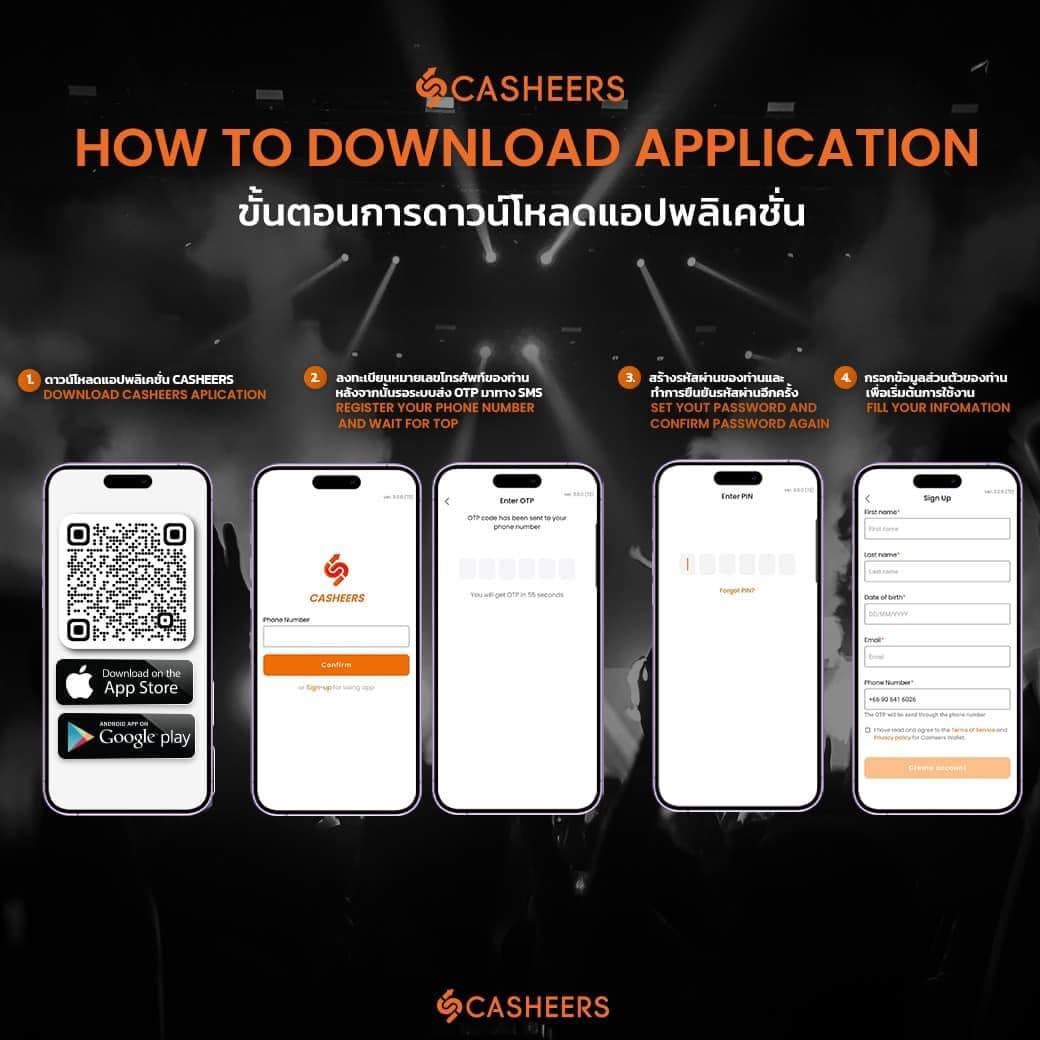
โดยท่านสามารถดูวิธีการดาวน์โหลด ยืนยันตัวตน และถอนเงินได้ดังต่อไปนี้
You can find How to download, verify, and withdraw instructions here
ลูกค้าสามารถดาวน์โหลดแอปพลิเคชัน ได้ที่
IOS : https://bit.ly/3Ijv6OV
ANDROID : https://bit.ly/3UHCk6I
You can download the application at
IOS : https://bit.ly/3Ijv6OV
ANDROID : https://bit.ly/3UHCk6I
We would like to inform you that due to changes in our terms and conditions effective today, we kindly request you to withdraw funds from your Casheers Cash Card and Casheers app by March 16th, 2024, for necessary adjustments according to the new terms and conditions.
Note: For any inquiries or further information, customers will not be able to withdraw funds after March 16th, 2567. If exceeded, please contact the company via E-mail: support@casheers.com or Line @Casheers
โดยท่านสามารถดูวิธีการดาวน์โหลด ยืนยันตัวตน และถอนเงินได้ดังต่อไปนี้
You can find How to download, verify, and withdraw instructions here
ลูกค้าสามารถดาวน์โหลดแอปพลิเคชัน ได้ที่
IOS : https://bit.ly/3Ijv6OV
ANDROID : https://bit.ly/3UHCk6I
You can download the application at
IOS : https://bit.ly/3Ijv6OV
ANDROID : https://bit.ly/3UHCk6I
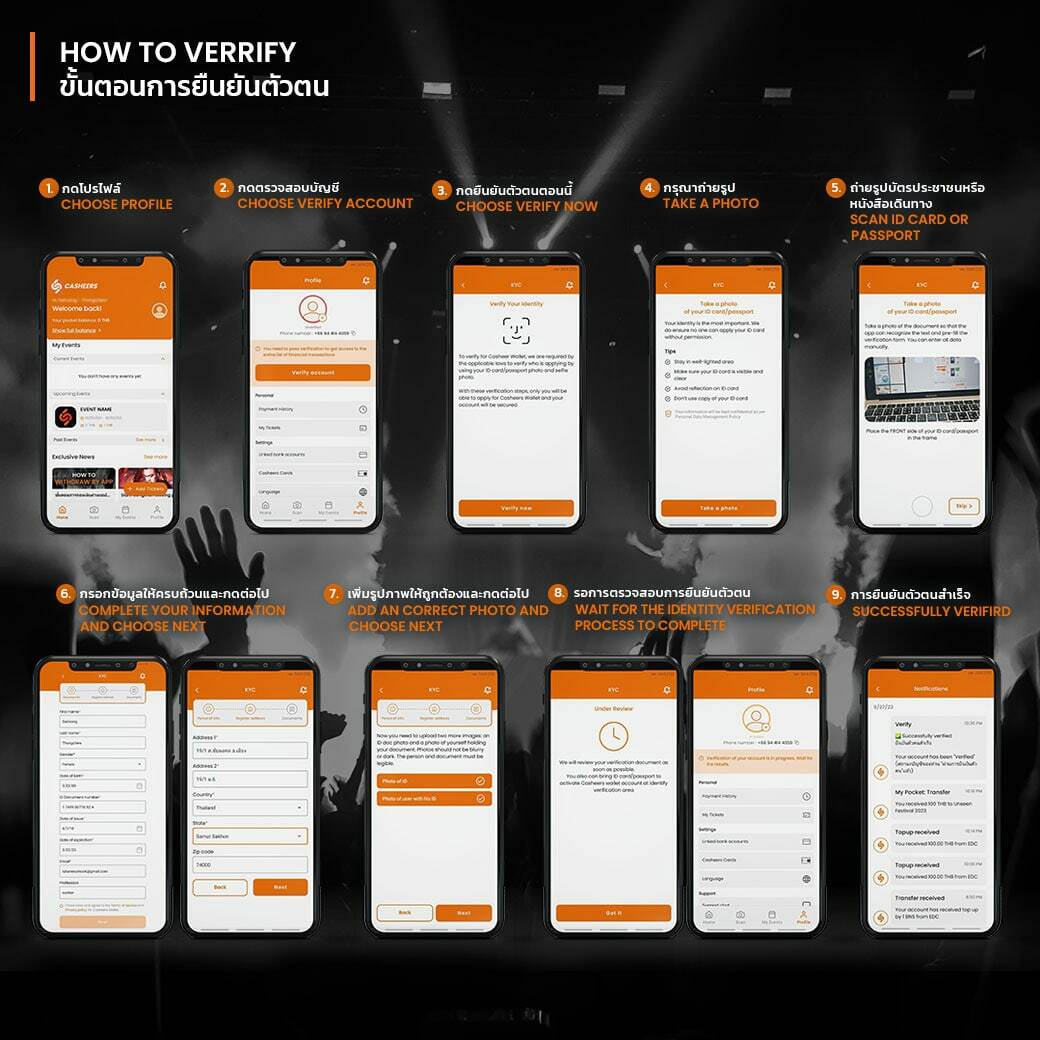
หากลูกค้าต้องการทำรายการถอนเงิน จะต้องทำการยืนยันตัวตนเป็นขั้นตอนแรก สามารถทำตามขั้นตอนดังนี้
ขั้นตอนการยืนยันตัวตน
1.เปิดแอปพลิเคชัน Casheers และลงชื่อเข้าใช้บัญชีของลูกค้า
2.ไปที่หน้าโปรไฟล์ และกดตรวจสอบบัญชี
3.กดยืนยันตัวตน
4.อ่านรายละเอียด และเงื่อนไขให้ครบถ้วน จากนั้นกดที่ถ่ายรูป
5.ถ่ายรูปบัตรประชาชน หรือหนังสือเดินทาง
6.กรอกข้อมูลให้ครบถ้วน และกดต่อไป
7.เพิ่มรูปภาพให้ถูกต้องและกดต่อไป
8.รอการตรวจสอบการยืนยันตัวตน ประมาณ 3-5 วัน
หมายเหตุ
1. ห้ามปกปิดใบหน้า หรือปกปิดข้อมูลบัตรประชาชน เพื่อเป็นการตรวจสอบการยืนยันตัวตน
2.ลูกค้าสามารถตรวจสอบสถานะการยืนยันได้ผ่านการแจ้งเตือนในแอปพลิเคชัน Casheers
ขั้นตอนการยืนยันตัวตน
1.เปิดแอปพลิเคชัน Casheers และลงชื่อเข้าใช้บัญชีของลูกค้า
2.ไปที่หน้าโปรไฟล์ และกดตรวจสอบบัญชี
3.กดยืนยันตัวตน
4.อ่านรายละเอียด และเงื่อนไขให้ครบถ้วน จากนั้นกดที่ถ่ายรูป
5.ถ่ายรูปบัตรประชาชน หรือหนังสือเดินทาง
- รูปบัตรประชาชน ต้องเห็นรายละเอียดชัดเจน
- รูปตนเองถือบัตรประชาชน
6.กรอกข้อมูลให้ครบถ้วน และกดต่อไป
7.เพิ่มรูปภาพให้ถูกต้องและกดต่อไป
8.รอการตรวจสอบการยืนยันตัวตน ประมาณ 3-5 วัน
หมายเหตุ
1. ห้ามปกปิดใบหน้า หรือปกปิดข้อมูลบัตรประชาชน เพื่อเป็นการตรวจสอบการยืนยันตัวตน
2.ลูกค้าสามารถตรวจสอบสถานะการยืนยันได้ผ่านการแจ้งเตือนในแอปพลิเคชัน Casheers
For withdrawal, you must go through an identity verification process. Please follow these steps.
Identity Verification Process
1. Open the Casheers application and log in to your account.
2. Go to the profile page and click on "Verify Account"
3. Click on "Verify now"
4. Read the details and conditions carefully, then click on "Take a Photo"
5. Take a clear photo of the ID card or passport.
6. Fill in all required information and click "Next"
7. Ensure that the images are correct and click "Next"
8. Wait for the identity verification process, which typically takes 3-5 days.
Note:
1. Do not cover your face or any information on the ID card to facilitate the identity verification process.
2. Customers can check the status of their verification through notifications in the Casheers application.
Identity Verification Process
1. Open the Casheers application and log in to your account.
2. Go to the profile page and click on "Verify Account"
3. Click on "Verify now"
4. Read the details and conditions carefully, then click on "Take a Photo"
5. Take a clear photo of the ID card or passport.
- The details must be visible.
- Hold the ID card alongside your face.
6. Fill in all required information and click "Next"
7. Ensure that the images are correct and click "Next"
8. Wait for the identity verification process, which typically takes 3-5 days.
Note:
1. Do not cover your face or any information on the ID card to facilitate the identity verification process.
2. Customers can check the status of their verification through notifications in the Casheers application.
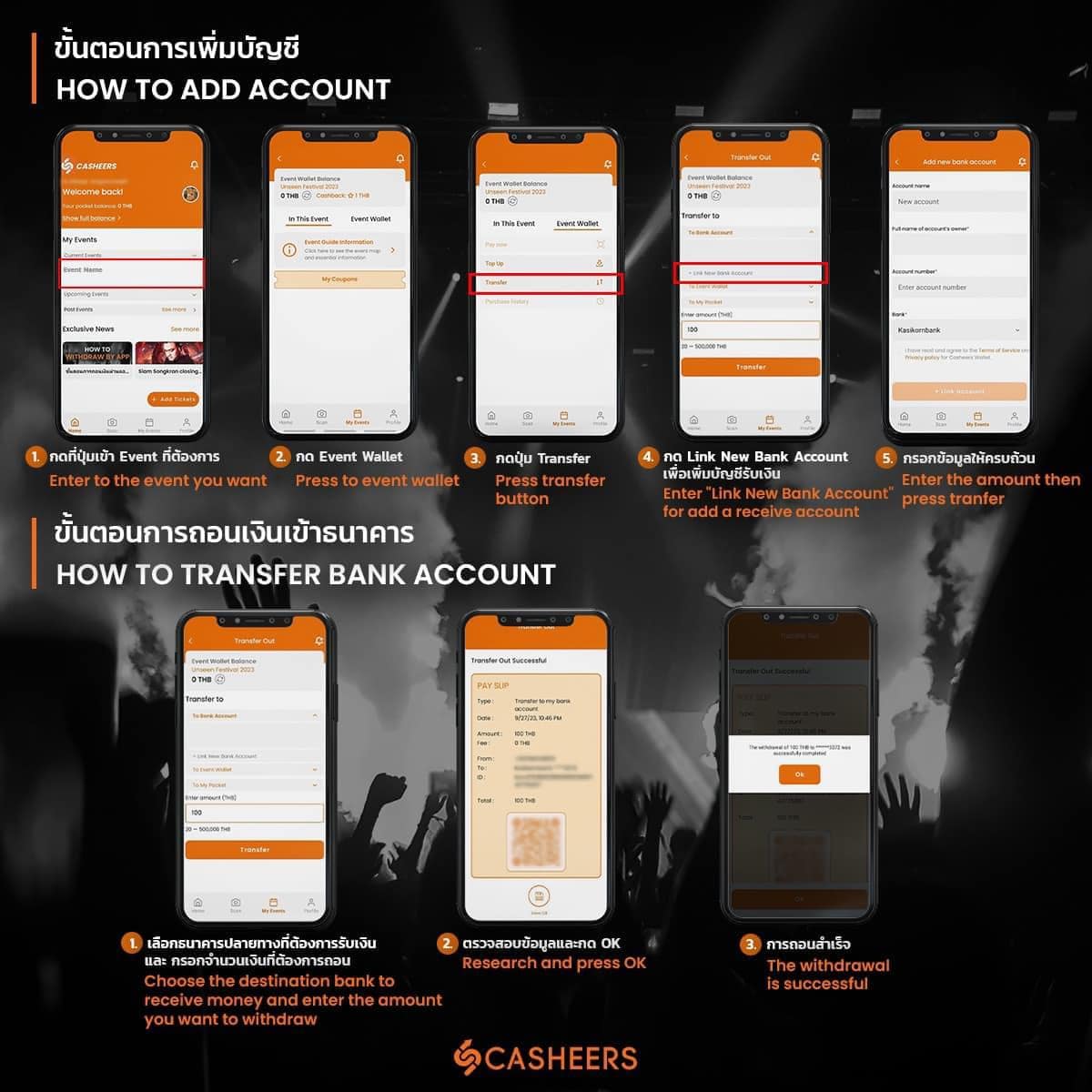
สำหรับลูกค้าที่ต้องการทำรายการ “ถอนเงินจากกระเป๋าเงินอีเวนท์เข้าบัญชีธนาคาร” หลังจากยืนยันตัวตนผ่านแล้ว สามารถทำตามขั้นตอนดังนี้
ขั้นตอนการเพิ่มบัญชี
1.กดเลือกอีเวนท์ที่ต้องการ
2.กดที่ กระเป๋าเงินอีเวนท์
3.กดที่ โอนเงิน
4.กดที่ บัญชีเพิ่มบัญชี
5.กรอกข้อมูลให้ครบถ้วน
หลังจากทำการเพิ่มบัญชีแล้วเรียบร้อย สามารถทำตามขั้นตอนดังนี้
ขั้นตอนการถอนเงินเข้าบัญชีธนาคาร
ขั้นตอนการเพิ่มบัญชี
1.กดเลือกอีเวนท์ที่ต้องการ
2.กดที่ กระเป๋าเงินอีเวนท์
3.กดที่ โอนเงิน
4.กดที่ บัญชีเพิ่มบัญชี
5.กรอกข้อมูลให้ครบถ้วน
หลังจากทำการเพิ่มบัญชีแล้วเรียบร้อย สามารถทำตามขั้นตอนดังนี้
ขั้นตอนการถอนเงินเข้าบัญชีธนาคาร
- เลือกธนาคารปลายทางที่ต้องการรับเงิน และกรอกจำนวนเงินที่ต้องการถอน
- ตรวจสอบข้อมูลให้เรียบร้อย และกดตกลง
- หากการถอนเงินสำเร็จ จะขึ้นข้อความเพื่อแจ้งเตือนสถานะการถอนเงินสำเร็จ
After successfully confirming your identity, withdraw money from the event wallet to your bank account. Please follow these steps.
Adding a Bank Account:
1. Select the event named “Casheers Withdrawal”
2. Tap on "Event Wallet"
3. Choose "Transfer"
4. Select "Add Bank Account" to add a receiving account.
5. Fill in all required information.
Once the bank account has been successfully added, you can proceed with the following steps.
Withdrawing Money to a Bank Account:
1. Select the destination bank where you want to receive the money and enter the withdrawal amount.
2. Review the information and confirm.
3. If the withdrawal is successful, you will receive a notification confirming the status of the withdrawal.
Adding a Bank Account:
1. Select the event named “Casheers Withdrawal”
2. Tap on "Event Wallet"
3. Choose "Transfer"
4. Select "Add Bank Account" to add a receiving account.
5. Fill in all required information.
Once the bank account has been successfully added, you can proceed with the following steps.
Withdrawing Money to a Bank Account:
1. Select the destination bank where you want to receive the money and enter the withdrawal amount.
2. Review the information and confirm.
3. If the withdrawal is successful, you will receive a notification confirming the status of the withdrawal.
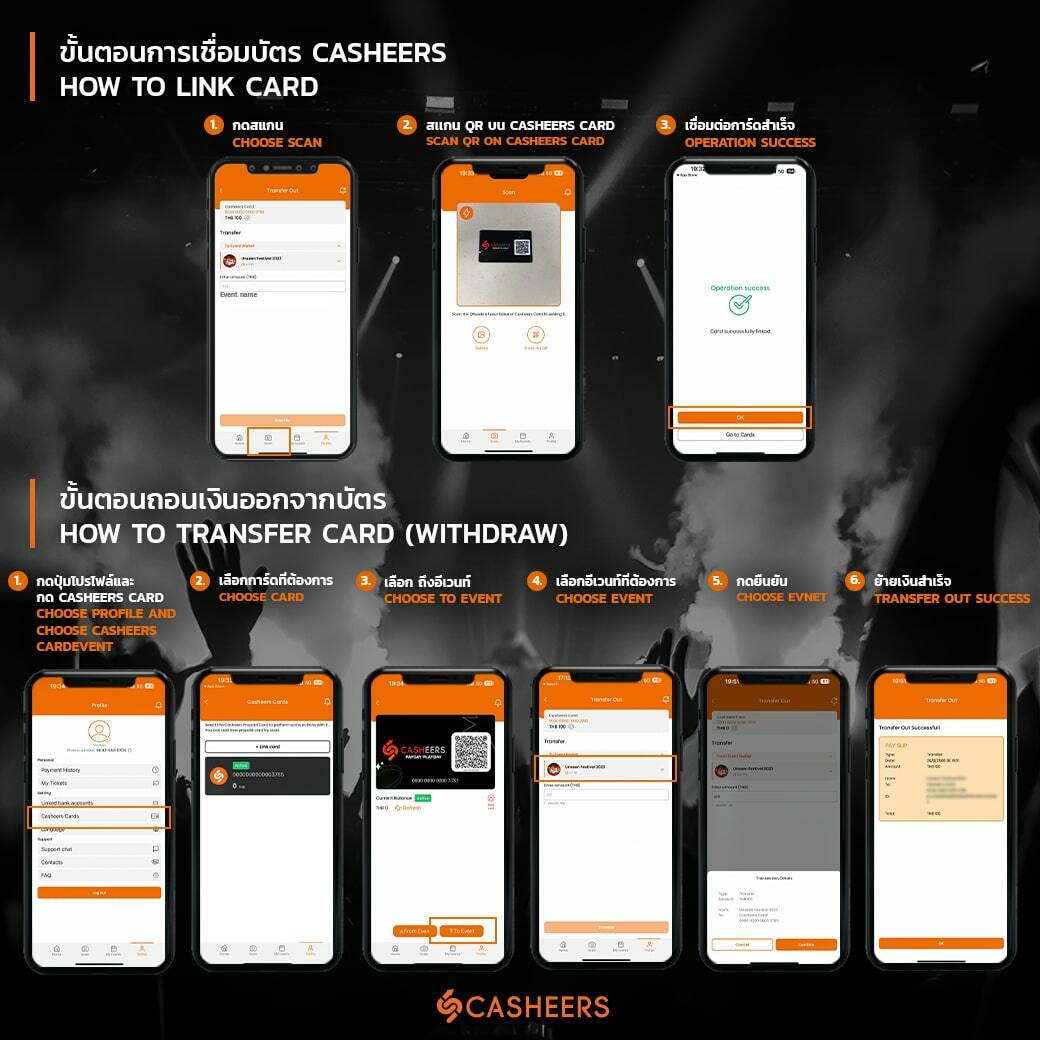
สำหรับลูกค้าที่ต้องการทำรายการ “ถอนเงินจาก Casheers card” หลังจากยืนยันตัวตนผ่านแล้ว สามารถทำตามขั้นตอนดังนี้
ขั้นตอนการเชื่อมบัตร Casheers
1.กดที่ สแกน
2.สแกนคิวอาร์โค้ดบนบัตร Casheers
3.หากการเชื่อมบัตรสำเร็จ จะขึ้นข้อความเพื่อแจ้งเตือนสถานะการเชื่อมบัตรสำเร็จ
หลังจากทำการเชื่อมบัตร Casheers เรียบร้อยแล้ว สามารถทำตามขั้นตอนดังนี้
ขั้นตอนการย้ายเงินออกจากบัตรไปอีเวนท์
หลังจากทำการย้ายเงินเข้าสู่อีเวนท์ Casheers withdrawal แล้วเรียบร้อย สามารถทำตามขั้นตอนดังนี้
ขั้นตอนการถอนเงินเข้าบัญชีธนาคาร
ขั้นตอนการเชื่อมบัตร Casheers
1.กดที่ สแกน
2.สแกนคิวอาร์โค้ดบนบัตร Casheers
3.หากการเชื่อมบัตรสำเร็จ จะขึ้นข้อความเพื่อแจ้งเตือนสถานะการเชื่อมบัตรสำเร็จ
หลังจากทำการเชื่อมบัตร Casheers เรียบร้อยแล้ว สามารถทำตามขั้นตอนดังนี้
ขั้นตอนการย้ายเงินออกจากบัตรไปอีเวนท์
- กดปุ่มโปรไฟล์ และเลือกที่ การ์ดแคชเชียร์
- เลือกบัตรที่ต้องการจะถอนเงินออก
- เลือกถึงอีเวนท์
- เลือกอีเวนท์ชื่อว่า Casheers withdrawal
- กดยืนยัน
- หากการย้ายเงินจากบัตรสำเร็จ จะขึ้นข้อความเพื่อแจ้งเตือนสถานะย้ายเงินจากบัตรเข้าอีเวนท์สำเร็จ
หลังจากทำการย้ายเงินเข้าสู่อีเวนท์ Casheers withdrawal แล้วเรียบร้อย สามารถทำตามขั้นตอนดังนี้
ขั้นตอนการถอนเงินเข้าบัญชีธนาคาร
- เลือกธนาคารปลายทางที่ต้องการรับเงิน และกรอกจำนวนเงินที่ต้องการถอน
- ตรวจสอบข้อมูลให้เรียบร้อย และกดตกลง
- หากการถอนเงินสำเร็จ จะขึ้นข้อความเพื่อแจ้งเตือนสถานะการถอนเงินสำเร็จ
After confirming their identity, customers who wish to withdraw money from their Casheers card can follow these steps.
Connecting the Casheers Card:
1. Tap on “Scan”
2. Scan the QR code on the Casheers card.
3. Upon successful connection, a message will appear to notify the status of the card connection.
Once the Casheers card has been successfully connected, customers can proceed with the following steps.
Transferring Money from the Card to an Event:
1. Tap on the profile button and select “Casheers Card”
2. Choose the card from which you want to withdraw money.
3. Select “To event”
4. Choose the event named “Casheers Withdrawal.”
5. Confirm the transfer.
Once the money has been transferred from the card to the “Casheers Withdrawal” event, you can proceed with the following steps.
Withdrawing Money to a Bank Account:
1. Select the destination bank where you want to receive the money and enter the withdrawal amount.
2. Review the information and confirm.
3. If the withdrawal is successful, you will receive a notification confirming the status of the withdrawal.
Connecting the Casheers Card:
1. Tap on “Scan”
2. Scan the QR code on the Casheers card.
3. Upon successful connection, a message will appear to notify the status of the card connection.
Once the Casheers card has been successfully connected, customers can proceed with the following steps.
Transferring Money from the Card to an Event:
1. Tap on the profile button and select “Casheers Card”
2. Choose the card from which you want to withdraw money.
3. Select “To event”
4. Choose the event named “Casheers Withdrawal.”
5. Confirm the transfer.
Once the money has been transferred from the card to the “Casheers Withdrawal” event, you can proceed with the following steps.
Withdrawing Money to a Bank Account:
1. Select the destination bank where you want to receive the money and enter the withdrawal amount.
2. Review the information and confirm.
3. If the withdrawal is successful, you will receive a notification confirming the status of the withdrawal.
ขอบคุณสำหรับความร่วมมือของท่านในการปรับเปลี่ยนนี้ ขออภัยในความไม่สะดวกที่เกิดขึ้น
ด้วยความเคารพอย่างสูง,
Casheers
Thank you for your cooperation in this change. We apologize for any inconvenience caused.
Best regards,
Casheers
ด้วยความเคารพอย่างสูง,
Casheers
Thank you for your cooperation in this change. We apologize for any inconvenience caused.
Best regards,
Casheers